


Talking Tom Cat 2
4.3120.50K Reviews
App Specs
- Version
- 6.2.0.560
- Updated On
- License
- Free
- Downloads
- 100,000,000+
- Developer
- Outfit7 Limited
- Categories
- Entertainment
- Platform
- Android, iOS
Screenshots
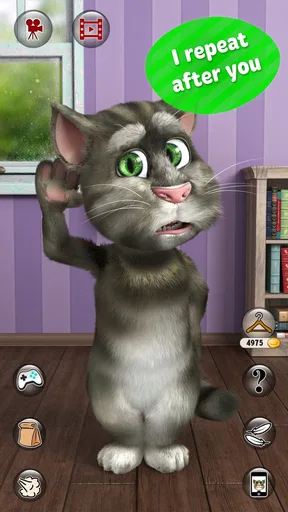
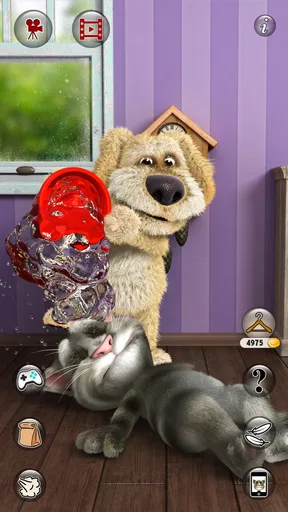
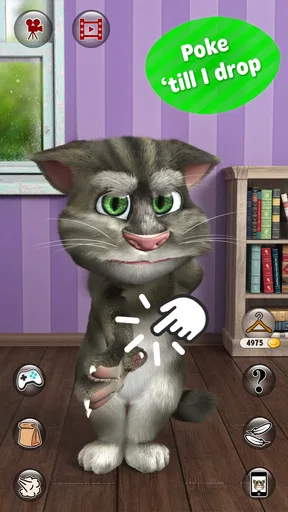
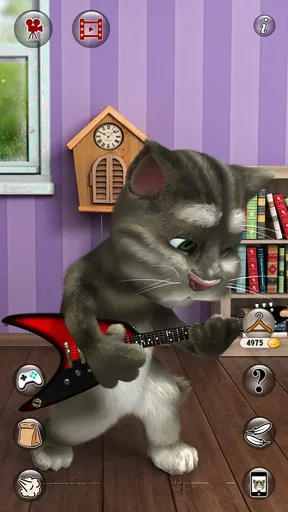


 Analysis by AppCompare
I’d treat Talking Tom Cat 2 as a shared little diversion rather than a pet app that needs a routine. Its appeal is immediate: speak to Tom, watch him echo you in a comically altered voice, and see what happens when someone taps the screen. That makes it easy to pass around at home when there are a few spare minutes, though it works best when everyone understands that Tom is a playful character on a screen, not a real animal to care for.
A typical household moment might be a child showing a parent a silly phrase Tom repeats, then handing the phone to a sibling to try their own. The short, back-and-forth interaction is a better fit for that kind of shared play than a long session that requires concentration. I’d keep the device with the adult or agree in advance who gets a turn, especially with younger children: the app does not need to become a source of arguments over who owns Tom or who gets to keep playing.
Sharing one device without turning it into a chore
Because the fun comes from direct interaction, a shared phone or tablet can be enough for several people to enjoy it together. One person can say a phrase, another can choose how to interact with Tom, and the group can decide whether to try a mini-game. That simple rotation gives everyone a part without requiring separate accounts or a complicated plan. It also makes the app useful for a brief wait at home, such as while dinner is being prepared, when a quick laugh is welcome but a full game session would be too much.
There is a practical trade-off, though: whoever has the device also controls the session. I’d set a clear stopping point before handing it over, rather than relying on the app to manage turns or screen time. If the phone is shared by adults and children, keep personal conversations and other open apps out of reach before passing it across. That is ordinary shared-device housekeeping, not a special feature of Tom, and it helps avoid accidental taps elsewhere.
What to settle before a child starts playing
The app is free to download, but optional in-app purchases range from $0.99 to $24.99 per item. If a child is using a family device, I’d make sure the adult responsible for purchases has set the device’s usual purchase safeguards before play. Coins and unlockable items can make the game loop more tempting, so it helps to explain that earning or waiting is part of the experience and that buying something is an adult decision. The app can be enjoyed without treating every locked item as a reason to spend.
There is also a useful distinction between letting a child try the app and making it a regular activity. Tom’s speech-repeat trick invites children to say things aloud, so I’d use it in a familiar, supervised setting and keep the interaction light. A shared family room is a more comfortable place for that than handing over a device without context. This is especially sensible when a child is still learning what belongs in a public recording or what should stay private.
Making recordings a deliberate choice
The ability to record Tom’s antics and share them can turn a private joke into something the family watches together, but I would not treat sharing as the default next step. Before recording, decide whether the clip is simply for the people in the room or whether an adult intends to send it elsewhere. A child’s voice may be part of the fun, so checking the clip before it leaves the device is a small, worthwhile habit. The feature is most enjoyable when the recording captures a deliberate joke rather than becoming an automatic step after every session.
Worth Reading Before You Choose

Flipboard Shows What News Apps Must Do Beyond the Feed

Switching to Android Auto Means Rethinking Your Driving Routine

Google Calendar Makes a Crowded Week Easier to Manage

Ludo King Makes the Most of the Minutes Between Plans

Baby Panda World Brings Quick Play to Modern Phones, but Its Game Library Feels Busy

ESPN’s Live Game View Makes Following Close Games Easier
For coordination, a simple household rule works better than assuming the app will organize anything: agree who is holding the device, whether purchases are off-limits, and whether recordings stay private. That arrangement lets children take turns while leaving decisions about spending and sharing with an adult. If the device moves between siblings, checking that the right person is ready before recording also avoids turning someone else’s impromptu moment into a clip they did not want to make.
Age, expectations, and trust
This is an entertainment app from Outfit7 Limited, and its content rating is Everyone 10+. I’d use that age guidance as a prompt for a parent to preview the experience and decide whether its playful interaction suits a particular child, rather than assuming that every child will respond to it in the same way. Some will enjoy copying Tom’s phrases and trying the touch reactions; others may lose interest once the novelty wears off. The best test is a short, shared first session, with an adult nearby to explain the purchase and recording choices.
It is also worth being clear about what kind of experience this is. Tom provides a quick, staged response to speech and touch; he is not a conversational assistant, a learning program, or a substitute for caring for a real pet. That distinction helps set expectations, especially for a child who might otherwise expect an ongoing relationship or a more substantial game. The app is strongest when the goal is a laugh, a playful imitation, or a short distraction.
The Charm of Talking Tom Cat 2
First off, Talking Tom Cat 2 is the sequel to the original Talking Tom app, and it brings a ton of new features that’ll keep you entertained for hours. If you’ve never experienced a talking pet app before, prepare to have your mind blown. Tom is your virtual buddy who not only repeats everything you say in a hilariously high-pitched voice but also has a slew of new tricks up his furry sleeves.
Interactivity at Its Finest
One of the things I absolutely love about this app is its interactivity. Tom can respond to your touch, and trust me, it’s super fun to see his reactions. You can pet him, poke him, and even tickle him to see what he does. Spoiler alert: He’s quite the giggler. The app’s developers have done a fantastic job making Tom’s animations smooth and realistic, which really brings him to life on your screen.
Not only that, but Tom’s got a whole new set of outfits and accessories that you can unlock as you play. Whether you want him dressed as a pirate or a cowboy, the customization options add a layer of fun to the experience.
Mini-Games Galore
Another feature that keeps me coming back to Talking Tom Cat 2 is the array of mini-games. These aren’t just time-fillers; they’re genuinely addictive. From whack-a-mouse to bubble-popping challenges, these games are perfect for when you need a quick break. Plus, playing these games earns you coins, which you can use to buy food and outfits for Tom.
The mini-games are simple yet engaging, making them suitable for players of all ages. They’re a great way to unwind and have some light-hearted fun.
Social Sharing and Connectivity
In today’s social media-driven world, sharing your experiences is key, and Talking Tom Cat 2 has got you covered. You can record videos of Tom’s antics and share them with your friends. Imagine the laughs when your friends hear Tom repeating your latest joke or see him dressed in a silly outfit!
This feature not only makes the app more interactive but also adds a social element that’s perfect for those who love to stay connected. It’s a great way to spread the fun and maybe even challenge your friends to beat your high score in the mini-games.
Technical Aspects and Usability
Now, let’s talk tech. The app is available on both Android and iOS, and installation is a breeze. It runs smoothly on most devices, and I haven’t experienced any major lags or crashes. The user interface is intuitive, making it easy for even the youngest users to navigate through the app without a hitch.
One thing to keep in mind is that while the app is free to download, there are in-app purchases. These can enhance your experience by unlocking certain items faster, but they’re not necessary to enjoy the full range of Tom’s antics.
For a quick decision, I’d choose this over a passive cartoon when someone wants to join in rather than just watch, and over a larger mobile game when there is only time for a few playful interactions. Compared with other talking-pet experiences, the draw here is the combination of Tom’s repeated speech, touch reactions, outfits, and small games. The trade-off is that it is built around a familiar loop: once the novelty of hearing your own words echoed has passed, it may not hold the attention of someone looking for a story, a deep challenge, or a more open-ended pet simulation.
The mini-games offer a practical way to vary a session without changing apps. I’d use them when the speech gag has run its course, then return to Tom’s reactions for a few turns rather than letting the game become an endless attempt to collect more items. If a player enjoys unlocking outfits, the coins earned through play give that goal a simple structure; if they do not care about customization, the core interaction still makes sense on its own. That difference matters when deciding whether the app is worth keeping on a shared device.
The app is free, and its audience scale is substantial: it has passed 100 million installs, with an average rating of 4.3 from around 3.4 million ratings. Those figures suggest that the basic character idea has broad appeal, but they do not guarantee that every child or adult will enjoy the same parts. I’d focus on whether the person using it likes short comic reactions and simple mini-games, not on popularity alone.
For device compatibility, the listed minimum is Android 6.0, and the current version is 6.2.0.560. The app has been available since August 22, 2011, so it is a long-running character experience rather than a new release built around current trends. I’d check that the device meets the minimum requirement before installing, then let the first session answer the more important question: does Tom’s style of humor actually land with the intended player?
When I’d choose it—and when I wouldn’t
I’d recommend it to someone who wants a low-commitment bit of entertainment, especially a household looking for an easy activity that a child and adult can share for a few minutes. It is also a reasonable pick for a fan of silly voices and expressive character animations who likes seeing small reactions to taps. It is less suitable for a player who wants a substantial progression system, a narrative campaign, complex controls, or a quiet activity that does not encourage speaking and replaying jokes aloud.
If the priority is calmer solo play, a puzzle game may be a better fit. If the goal is a genuine conversational tool, a voice assistant is designed for a different purpose and should not be confused with Tom’s scripted entertainment. And if a child wants a virtual companion that involves ongoing responsibilities, this app is not a replacement for that kind of experience. Choosing the right alternative depends on what the household is trying to do, not on which app has the most familiar character.
A few practical habits make the experience better
On a shared device, I’d keep a turn short and specific: try a few phrases, explore a couple of touch reactions, then decide together whether to play a mini-game. That keeps the app from becoming a vague default whenever someone asks for a screen. If the player is interested in outfits, make earning coins part of the fun rather than promising a particular item; it gives the mini-games a purpose without making purchases the focus.
When recording, test the idea with an adult first and review the clip before sharing it. A funny phrase can sound different outside the room, and a recording may include more than the person intended. That small pause makes the social feature feel like a choice rather than an automatic part of play. Likewise, putting a clear purchase boundary in place before a child starts avoids interrupting a good moment to negotiate about an item.
The practical questions are straightforward: can it be enjoyed without paying? Yes—the app is free, and purchases are optional rather than necessary for the basic interactions described here. Is it suitable for every young child? Its Everyone 10+ rating is a reason for adults to consider the child and supervise the first use. Is it a full game? I’d call it a collection of brief interactions and mini-games, not a long-form adventure. Can the household use one device? The shared-device approach works naturally for taking turns, provided the family handles turn-taking, purchases, and recordings themselves.
Final Thoughts
All in all, Talking Tom Cat 2 is a delightful app that brings a virtual pet to life in a way that’s both entertaining and engaging. Whether you’re looking for a fun way to pass the time, a new friend to chat with, or just some light-hearted entertainment, Tom’s got you covered. His charm is irresistible, and with so many features and mini-games, it’s impossible not to smile while playing.
So, if you’re ready to add a little fun to your day, why not give Talking Tom Cat 2 a try? It’s a purrfect way to unwind and enjoy some laughs. Happy app-ing!
My household verdict is that this works best as a small, shared treat: a few minutes of voices, reactions, or mini-games, followed by handing the device back. I would install it for that specific use, especially when a child enjoys playful imitation, but I would skip it for anyone expecting a rich game or a pet that develops through sustained care. Keep spending and recording decisions with an adult, agree on turns, and the app’s simple charm is much easier to enjoy without letting it take over the room.
Pros
- Engaging animations keep users entertained.
- Variety of interactions for endless fun.
- Simple interface suitable for all ages.
- Regular updates with new features.
- No internet required for basic gameplay.
Cons
- In-app purchases can add up quickly.
- Ads may interrupt gameplay frequently.
- Limited free content without purchases.
- Repetitive sound effects can annoy some.
- Privacy concerns with voice recording.
FAQs for Talking Tom Cat 2
What are the main features of Talking Tom Cat 2?
Talking Tom Cat 2 offers a variety of interactive features. Tom can mimic your voice in a funny tone, entertain you with humorous actions, and respond to touch gestures. The app includes mini-games, customizable outfits, and new environments for Tom to explore. These engaging features make it a hit among users of all ages.
Is Talking Tom Cat 2 safe for children to use?
Yes, Talking Tom Cat 2 is designed to be child-friendly. The app is rated for users aged 4 and up, featuring playful graphics and interactive elements that appeal to children. However, parents should be aware of in-app purchases and advertisements, ensuring that appropriate settings are enabled for a safe experience.
Does Talking Tom Cat 2 require an internet connection?
Talking Tom Cat 2 does not require a constant internet connection to function. However, some features, such as in-app purchases and accessing additional content or updates, will need internet access. It's advisable to connect occasionally to enjoy the full range of offerings and keep the app up-to-date.
Are there any in-app purchases in Talking Tom Cat 2?
Yes, Talking Tom Cat 2 includes various in-app purchases. Users can buy virtual items like outfits, coins, and other enhancements to customize Tom's appearance and interactions. These purchases are optional and can enhance the gameplay experience, but they are not necessary for enjoying the app's basic features.
How does Talking Tom Cat 2 handle user privacy?
Talking Tom Cat 2 takes user privacy seriously. The app collects minimal data necessary for improving user experience, with a focus on safeguarding personal information. Users can review the privacy policy within the app settings to understand what data is collected and how it is used, ensuring transparency and control.


